ExoJIT: define and run fused kernels in Python
User-schedulable languages like the Exo Python-DSL let users write numerical kernels and declaratively optimize their scheduling (e.g. loop unrolling).
So far, benchmarking any given schedule in the Python-DSL and invoking it in a CPython runtime required several tedious steps.
This is because Exo’s compiler emits C and header files, requiring separate compilation, linking process and FFI calls or CPython extensions.
We introduce exojit, a just-in-time
compiler for Exo procedures that alleviates all these pain-points, by letting
users annotate their Exo functions with @jit(optimize=...) and invoke them
like regular Python functions.
The Exo compiler applies the schedule and verifies that invariances are held. Then we translate Exo’s LoopIR through xDSL to LLVM, use the MCJIT engine to generate the binary and bind it with CFFI.
---
config:
  htmlLabels: false
  flowchart:
    nodeSpacing: 18
    rankSpacing: 22
    padding: 8
    subGraphTitleMargin:
      top: 6
      bottom: 10
---
flowchart LR
    subgraph schedule["Part 1"]
        source["Python Exo<br/>@jit(optimize=...)"] --> rewrite["Schedule rewrite<br/>fission, reorder,<br/>tile, unroll"] --> loopir["LoopIR"]
    end

    subgraph lower["Part 2"]
        analyses["Analyses"] --> xdsl["xDSL MLIR"] --> dialect["LLVM dialect"]
    end

    subgraph jit["Part 3"]
        llvm["llvmlite IR"] --> optimize["O3 passes"] --> mcjit["MCJIT"] --> native["Native code"]
    end

    loopir --> analyses
    dialect --> llvm
    loopir -.-> exoc["C backend"] --> c["C<br/>--c"]
    dialect -.-> mlir["MLIR<br/>--mlir"]
    optimize -.-> asm["ASM<br/>AArch64"]

    style schedule fill:transparent
    style lower fill:transparent
style jit fill:transparent@proc
def add4(x: f32[4], y: f32[4]):
for i in seq(0, 4):
x[i] += y[i]
void add4(float *x, const float *y) {
    for (int i = 0; i < 4; i++) {
        x[i] += y[i];
    }
}
llvm.func @add4(%x: !llvm.ptr, %y: !llvm.ptr) {
  %c0 = llvm.mlir.constant(0 : i64) : i64
  %c1 = llvm.mlir.constant(1 : i64) : i64
  %c4 = llvm.mlir.constant(4 : i64) : i64
  llvm.br ^loop(%c0 : i64)

^loop(%i: i64):
  %more = llvm.icmp "slt" %i, %c4 : i64
  llvm.cond_br %more, ^body, ^exit

^body:
  %xi = llvm.getelementptr %x[%i] : (!llvm.ptr, i64) -> !llvm.ptr, f32
  %yi = llvm.getelementptr %y[%i] : (!llvm.ptr, i64) -> !llvm.ptr, f32
  %vx = llvm.load %xi : !llvm.ptr -> f32
  %vy = llvm.load %yi : !llvm.ptr -> f32
  %sum = llvm.fadd %vx, %vy : f32
  llvm.store %sum, %xi : f32, !llvm.ptr
  %next = llvm.add %i, %c1 : i64
  llvm.br ^loop(%next : i64)

^exit:
  llvm.return
}
_add4:
    ldr     q0, [x1]
    ldr     q1, [x0]
    fadd.4s v0, v1, v0  ; SIMD optimization
    str     q0, [x0]
    ret
Users can now write, schedule, execute, benchmark and verify a kernel all in the same Python script, making experimentation with Exo a lot more pleasant to integrate into their existing workflow and opening up the door to faster iteration cycles for humans, LLMs and auto-schedulers.
For example, the following schedule reuses a small stack buffer and keeps memory accesses contiguous so the inner loop can be auto-vectorized. In our benchmark, the scheduled kernel ran 2.11x as fast as the unscheduled one.1
# /// script
# requires-python = "==3.14.*"
# dependencies = ["exojit @ git+https://github.com/sueszli/exojit"]
# ///

import math
import random

from exo import *
from exo.API import Procedure
from exo.libs.memories import DRAM_STACK
from exo.stdlib.scheduling import divide_loop, fission, lift_alloc, reorder_loops, set_memory, simplify, stage_mem

from exojit import jit


# The schedule transforms the 32×32 matmul into:
#
# acc = empty((2, 32), dtype=float32)  # one reusable stack tile
# for i in range(0, 32, 2):
#     acc[:, :] = 0.0
#     for k in range(32):
#         for ii in range(2):
#             for j in range(32):
#                 acc[ii, j] += A[i + ii, k] * B[k, j]
#     out[i:i + 2, :] = acc
def optimize_matmul(p: Procedure) -> Procedure:
    # found through llm autoresearch
    p = divide_loop(p, "j", 32, ["jo", "ji"], perfect=True)
    p = reorder_loops(p, "i jo")
    p = divide_loop(p, "i", 2, ["io", "ii"], perfect=True)
    p = stage_mem(p, p.find_loop("ii").as_block(), "out[2*io:2*io+2, 32*jo:32*jo+32]", "acc")
    p = fission(p, p.find_loop("k").before(), n_lifts=2)
    p = reorder_loops(p, "ji k")
    p = reorder_loops(p, "ii k")
    p = lift_alloc(simplify(p), "acc", n_lifts=2)
    return set_memory(p, "acc", DRAM_STACK)


@jit(optimize=optimize_matmul)
def matmul(
    out: f32[32, 32] @ DRAM,
    A: f32[32, 32] @ DRAM,
    B: f32[32, 32] @ DRAM,
):
    for i in seq(0, 32):
        for j in seq(0, 32):
            out[i, j] = 0.0
            for k in seq(0, 32):
                out[i, j] += A[i, k] * B[k, j]


def test_matmul():
    A = [[random.uniform(-1.0, 1.0) for _ in range(32)] for _ in range(32)]
    B = [[random.uniform(-1.0, 1.0) for _ in range(32)] for _ in range(32)]
    out = [[0.0] * 32 for _ in range(32)]
    expected = [[sum(A[i][k] * B[k][j] for k in range(32)) for j in range(32)] for i in range(32)]

    matmul(out, A, B)
    assert all(math.isclose(out[i][j], expected[i][j], rel_tol=1e-5, abs_tol=1e-5) for i in range(32) for j in range(32))


if __name__ == "__main__":
    test_matmul()
The matrix multiplication example shows what a schedule can do to optimize one
kernel. We can also put several kernels behind a single @jit.
For instance, the query, key and value projections in attention are three matrix multiplications.
matmul(q, x, wq)
matmul(k, x, wk)
matmul(v, x, wv)
With ExoJIT, one call to fused_attention runs all three. Here matmul is
the same matrix multiplication written as an Exo @proc.
from exo import DRAM, proc
from exojit import jit


@proc
def matmul(out: f32[32, 32] @ DRAM, a: f32[32, 32] @ DRAM, b: f32[32, 32] @ DRAM):
    ... # see above


@jit
def fused_attention(
    x: f32[32, 32] @ DRAM,
    wq: f32[32, 32] @ DRAM, wk: f32[32, 32] @ DRAM, wv: f32[32, 32] @ DRAM,
    q: f32[32, 32] @ DRAM, k: f32[32, 32] @ DRAM, v: f32[32, 32] @ DRAM,
):
    matmul(q, x, wq)
    matmul(k, x, wk)
    matmul(v, x, wv)


fused_attention(x, wq, wk, wv, q, k, v)
Separate dispatches
---
config:
  sequence:
    mirrorActors: false
    actorMargin: 28
    width: 100
    height: 34
---
sequenceDiagram
    participant P as CPython
    participant N as matmul
    P->>N: Project Q
    N-->>P: return
    P->>N: Project K
    N-->>P: return
    P->>N: Project V
    N-->>P: return
Fused kernel
---
config:
  sequence:
    mirrorActors: false
    actorMargin: 28
    width: 100
    height: 34
---
sequenceDiagram
    participant P as CPython
    participant F as fused_attention
    P->>F: Project Q, K and V
    F-->>P: return
We can apply the same principle to an entire machine learning model if it’s small enough, like Andrej Karpathy’s MicroGPT.
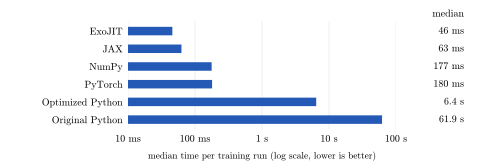
JAX was the only other compiler we tested that gave us the primitives to run the
whole training loop in one compiled call. We wrote the loop with jax.lax.scan
and compiled it with @jax.jit. On the CPU, ExoJIT was 1.37x faster than JAX
and about 4x faster than NumPy and PyTorch.2
The MicroGPT implementation and its benchmark are in the ExoJIT repository.
It was fun to follow the model down to individual assembly instructions. We understand a little more now and there’s plenty left to try. Thanks for spending some of your curiosity with us.
-
Apple M2 Pro (Arm64, 12 CPU cores). Median time per call across n = 9 timed batches per variant (10,000 calls/batch) after one untimed warm-up batch. ↩
-
Apple M2 Pro (Arm64, 12 CPU cores). Median of n = 5 timed 1,000-step runs per implementation after one untimed 1,000-step warm-up. Model and optimizer reset before each run. Final weights checked against the MicroGPT reference after timing. ↩